

Well, has this ever happened to you? You spent the whole day in the sun, soaking wet in the rain, and you shot a great vlog. The camera framing was perfect, the lighting was cinematic. But when you got home and played it back on the editing panel, all you heard was the sound of the wind blowing and the honking of cars on the road! You couldn’t even hear your own voice.
- 1. The surprise that awaits when you open the box (Unboxing Experience)
- 2. Design: What does it look like and how does it feel to use?
- 3. Let’s get to the point: How is the audio quality?
- 4. 32-Bit Float Recording: “Brahmastra” for Content Creators
- 5. Peace in the midst of noise: Advanced Noise Cancellation (ENC)
- 6. Internal storage: When the camera is unfaithful
- 7. Battery life: What to think about charging?
- 8. Range: Does it really work from 250 meters away?
- 9. Who is the Hollyland Lark Max 2 for?
- 10. Competing with competitors (DJI Mic 2 and Rode Wireless Pro)
- 11. Pro-Tips (How to get the best output from your mic)
- 12. Pros and cons (at a glance)
- 13. Some common questions and answers (FAQ)
- Final words: Should you really buy this?
Trust me, as a content creator, there is nothing more frustrating than this. I have been in this situation countless times myself.
Even if the video quality is 1080p, the audience accepts it, but if the audio is bad, people won’t watch the video even for 5 seconds. And in search of a permanent solution to this problem, I have been exploring the world of wireless microphones for the past few weeks. After searching through DJI, Rode, Saramonic—I finally got my hands on one. Hollyland Lark Max 2।
To be honest, the first version (Lark Max) was already great. But is this new upgrade really worth your hard-earned money? Let’s get to the real review, without any sponsored chatter.
1. The surprise that awaits when you open the box (Unboxing Experience)
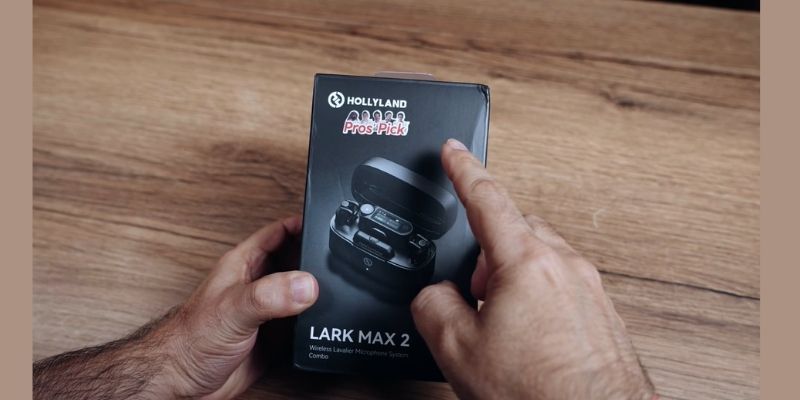
I’ve always been a bit picky about unboxing gadgets. When you’re spending a good amount of money on a premium piece of gear, the unboxing experience should be special. Hollyland didn’t disappoint here.
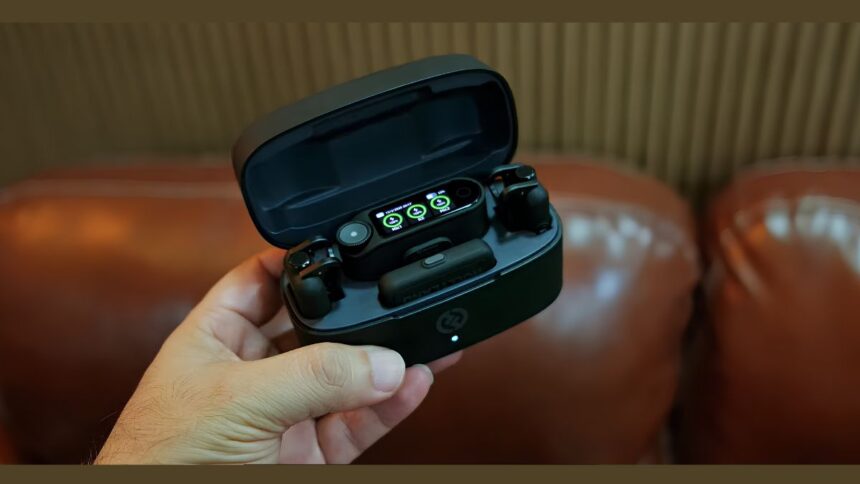
Upon opening the box, the first thing you’ll notice is a matte-finish charging case. I find it a bit sleeker than the previous version.
What’s actually inside the box?
- 1 smart receiver (to be attached to a camera or phone)
- 2 transmitters (mics for you and your guest)
- Charging case (which acts like a power bank)
- 2 windshields or deadcats (that furry thing that blocks wind noise)
- 3.5mm cable for attaching to camera
- Lightning cable for iPhone and Type-C cable for Android
- And finally, a sturdy carrying pouch to keep everything neatly organized.
What I like most is that you don’t have to buy any separate cables for your mobile or camera from the market. They have provided everything in the box.
2. Design: What does it look like and how does it feel to use?
When you’re talking on video, how the microphone looks hanging close to your chest matters a lot. There are many microphones that are so large in size that they look very odd.
Transmitter (Mic):
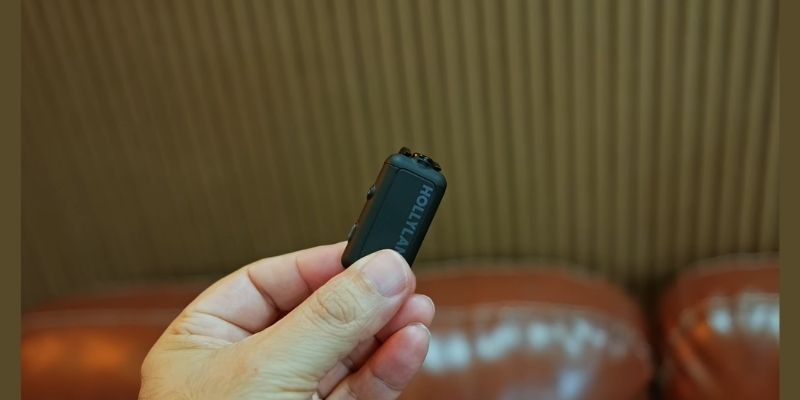
The Lark Max 2’s mics are quite compact in size. But its most magical feature is the ‘magnet’ on the back. Usually, the mic has a clip that needs to be attached to the shirt collar. But suppose you are wearing a round-necked T-shirt. When you attach the clip, the collar hangs down, which looks ugly.
Here Hollyland has provided a small piece of magnet. You place the mic on top of the T-shirt, and place the magnet inside the shirt. Voila! The mic will be stuck in the perfect position. It is so strong that there is no chance of it falling off even if you run.
Receiver touchscreen:
The small AMOLED display on the top of the receiver is so bright that it’s easy to see the battery level or audio meter even in bright sunlight. Its menu navigation is just like our smartphones. The touch response is very fast. There’s a small knob on the side, which you can easily control the volume by turning.
3. Let’s get to the point: How is the audio quality?
No matter how beautiful the design, the main function of a microphone is to record the voice properly. They used it in the Lark Max 2MaxTimbre 2.0 technology।
While the name may sound technical, in simple terms it means that it naturally captures the bass or tone of your voice. If you speak into a cheap mic, you might sound nasal or robotic. But when you listen to the audio recorded with it, it will sound like you are speaking into an expensive studio condenser mic. It is simply amazing for podcasts or voiceovers.
4. 32-Bit Float Recording: “Brahmastra” for Content Creators
Now we come to the most important point of this article. Even if you don’t understand much technical stuff about audio, this one feature alone will change the way you make videos.
What is this 32-bit float?
Suppose you are taking an interview. Suddenly the person in front of you laughs very loudly or you shout during an action scene. In a normal microphone, the audio breaks (which we call clipping). The broken audio cannot be fixed in editing.
But the Lark Max 2 has 32-bit float recording. This means that no matter how loud you shout, the audio won’t crack! And if you whisper too much, you can turn up the volume and clear it up during editing, without any extra noise. Simply put, you don’t have to worry about setting the audio level anymore. Shoot and relax.
5. Peace in the midst of noise: Advanced Noise Cancellation (ENC)
For those who do travel vlogs or report news from the side of the road, the biggest enemy is ambient noise.
I tested this mic myself at one of the busiest intersections in Dhaka city. There were car horns and people shouting from all around, and it was a lonely situation. As soon as I pressed the yellow button on the side of the mic, ‘Noise Cancellation’ was turned on.
Believe it or not, I was surprised after listening to the playback. The annoying background horn and engine noise was almost 85% gone! The most refreshing thing is that even with the noise cancellation turned on, my voice didn’t sound too muffled or artificial, which is often the case with other brands of mics.
But yes, here’s a little tip. If you’re shooting in a quiet room, it’s best to keep noise cancellation off. This will preserve 100% of the natural depth of your voice.
6. Internal storage: When the camera is unfaithful
Imagine, you talked about an important topic for half an hour. At the end of the shoot, you realized that you forgot to connect the microphone cable to the camera! Or the camera didn’t record audio for some reason. How would your head be broken then?
To prevent this accident from happening, Hollyland has built a microphone inside each of their microphones.8 GB internal memory This means that even if your camera or phone ever fails to pick up audio, this mic can record audio continuously for up to 14 hours.
You plug the mic into your laptop with a Type-C cable, it opens like a pen drive, and you can copy the high-quality audio file from there. I call this the “Life Saver” feature.
7. Battery life: What to think about charging?
Running out of battery while shooting is a nightmare for any creator. But the Lark Max 2’s battery won’t let you have that nightmare.
- Mike (Transmitter):It can last for 7 to 8 hours on a full charge.
- Receiver: The receiver’s battery lasts for about 9 hours.
- Charging case: This case has a pretty big battery inside. As soon as you put the mics in the case, they start charging again. With this case, it is possible to charge the entire setup from zero to full at least 2 to 3 times.
All in all, you are almost22-24 hour backup That is, even if you go hiking in the mountains or somewhere where there is no electricity for 3 days, your audio recording will not stop.
8. Range: Does it really work from 250 meters away?
It says in big letters on the box—”820 feet or 250 meters wireless range.”
Do any of us actually go 250 meters away from the camera to make a video? Absolutely not. But having this range means that its signal is very strong.
Even if you are 20-30 meters away from the camera and there is a tree, wall or crowd of people between you and the camera, the connection will not drop. The audio will not be cut off even a single drop. However, if you put the mic on your chest and start walking far away with your back to the camera, then there may be a little signal loss, which happens with any wireless mic.
9. Who is the Hollyland Lark Max 2 for?
Will everyone buy this mic? The answer is, no. You have to choose it according to your needs.
1. Professional YouTuber and Vlogger: If you’re serious about the quality of your channel, this will give your videos a professional vibe.
2. Podcaster and Interviewer: With 32-bit float and stereo mode, it’s perfect for recording two-person conversations or interviews.
3. Corporate Video Maker: This will be of great use to those who make small ad films or real estate promotions.
4. Online teacher or trainer: If you take live classes using Zoom or OBS, you can get studio grade audio by plugging it directly into your laptop.
10. Competing with competitors (DJI Mic 2 and Rode Wireless Pro)
There are better mics on the market, so why Hollyland? Let’s do a little comparative discussion.
- Comparison with DJI Mic 2:DJI’s design is very nice, and their mic can be connected directly to the camera’s Bluetooth. But if you’re just thinking about ‘sound quality’ and ‘noise cancellation’, I’d say the Hollyland Lark Max 2 is a step ahead.
- Comparison with Rode Wireless Pro: Rode is the king of the audio world. Their Wireless Pro has a feature called ‘Timecode’, which is useful for big filmmakers. But Rode is much more expensive in terms of price. For a solo creator or YouTuber, Hollyland offers much more value for money than Rode.
11. Pro-Tips (How to get the best output from your mic)
If you decide to buy this mic, these little tips will come in handy:
- Placement: Don’t place the mic too close to your throat. Placing it slightly above your chest (about a hand’s breadth below your throat) will produce the most natural sound.
- Windshield use: Many people put a deadcat or windshield over the mic indoors for style. Don’t do this. Putting it indoors makes the sound a little muffled. Only use it outdoors in strong winds.
- Safety Track: Always turn on ‘Safety Track’ from the receiver’s menu. This records a copy of your audio at a slightly lower volume (-6dB). This will save you even if the main audio is lost.
12. Pros and cons (at a glance)
Just as everything has its good sides, it also has some limitations.
What’s great (Pros):
- Excellent natural sound quality (Max Timbre 2.0).
- 32-bit float recording, so there’s no fear of audio cracking.
- Great magnetic clip system.
- Huge battery life of 24 hours.
- Smartphones, cameras, laptops—it works with everything.
What I didn’t like (Cons):
- The windshield is a bit too big for the size of the mic. It’s a bit difficult to press the buttons on the side of the mic with the windshield attached.
- The price may seem a bit high for beginners.
- It does not have Bluetooth Direct connection (which the DJI Mic 2 has).
13. Some common questions and answers (FAQ)
Question: Can I use this directly on my iPhone 15 or Android?
Answer: Absolutely! Just plug it directly into the phone using the Type-C cable that comes with the box. It works great with the phone’s default camera app, no need to download a separate app.
Question: Will this be good for live streaming?
Answer: Of course. If you want, you can connect the receiver directly to your laptop’s USB port. The laptop will recognize it as an external sound card. You’ll get studio-quality sound on Facebook Live or Zoom meetings.
Question: Can this record two people speaking on separate tracks?
Answer: Yes. If you select ‘Stereo Mode’ on the receiver, the sound from Mic-1 will be recorded on the left channel and the sound from Mic-2 on the right channel. Later, in editing, you can reduce or increase the volume of one if you want.
Final words: Should you really buy this?
After such a long discussion, you might be wondering, “What’s the final conclusion? Should I buy this?”
My personal opinion is that if you are just starting out on YouTube and your budget is very limited, you don’t need such an expensive mic right now. There are many good mics in the market for 2-3 thousand taka.
But…If you are a regular content creator, if making videos is your passion or profession, and you want to give your viewers a premium audio experience—then Hollyland Lark Max 2A solid investment for you.
Just think about how much easier a mic that gives you superpowers like 32-bit float, works magic with noise cancellation, and also relieves you from the tension of running out of battery—it will make your video making process easier! If you buy a good audio gear, it will serve you for the next 3-4 years without a second thought. That’s why the Lark Max 2 won’t disappoint you, that much is guaranteed.
Stop struggling with audio. Make your content more professional and awesome!
Your turn!
Thanks so much for reading the article! What mic are you currently using for your videos? Have you ever had any funny or annoying experiences with audio? Let me know by commenting below. I’d love to chat with you!