
Let’s start with the truth. Whenever you go to any PC gaming community and ask, “Bro, which gaming mouse is better between 1000 taka and 2000 taka?” then most of the so-called ‘pro-gamers’ will tell you to save up and buy an expensive mouse from Logitech or Razer. But the reality is, not everyone can afford to buy a mouse for 5-10 thousand taka. Especially if you are a student, or have just built a gaming PC, your pocket is already empty.
- Unboxing Experience: What’s in the box?
- DAWG Slay 25 Review: Best Mouse Under Rs. 1000?
- Design and build quality
- Technical Specifications: Sensors and Performance
- Our Gaming Experience and a Small Problem
- DAWG Slay 50 Review: The wireless king under Rs. 2000!
- Design and button placement
- Charging Dock: Game Changer!
- Technical Specifications: Slay 50
- Battery backup and gaming performance
- Head-to-head comparison: Which one should you buy?
- Terms You Should Know Before Buying a Gaming Mouse (A Beginner’s Guide)
- 1. What is Polling Rate?
- 2. What does DPI (Dots Per Inch) actually do?
- 3. IPS (Inches Per Second) এবং Acceleration
- 4. Why are PTFE Feet so important?
- The future of budget gaming Mouse in 2024-25
- Our Final Verdict
- Frequently Asked Questions (FAQs)
A few days ago, we reviewed some Mouse from Cosmic Byte, and the response was amazing! So we thought we’d talk about some more ‘spicy’ gadgets on a budget.
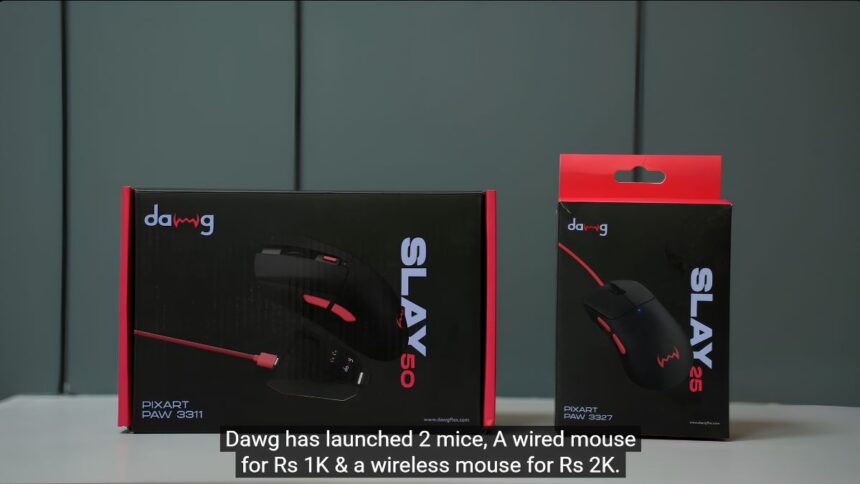
Recently DAWG A brand called has launched two new Mouse . One is DAWG Slay 25—which is a wired mouse and costs only around 1000 taka. The other one is DAWG Slay 50—This is a wireless mouse worth Rs. 2000, which comes with a whole charging dock in the box!
In today’s article, we’ll go over the details of these two Mouse , from unboxing them to their internal technical specs, gaming performance, and actual user experience. Let’s see if these budget Mouse are really worth your money.
Unboxing Experience: What’s in the box?
The first impression of any product is created from its box. DAWG has done a pretty good job in this area.
DAWG Slay 25 (Wired):
The box of the mouse is very basic. A red and black theme has been used. Upon opening the box, you will first get the mouse, which has a red braided cable attached to it. Apart from that, the box also contains a thank you card, some cool stickers (Lets flex your DAWG) and a QR code to read the user manual. The packaging is quite sleek for a mouse that costs Rs. 1000.
DAWG Slay 50 (Wireless):
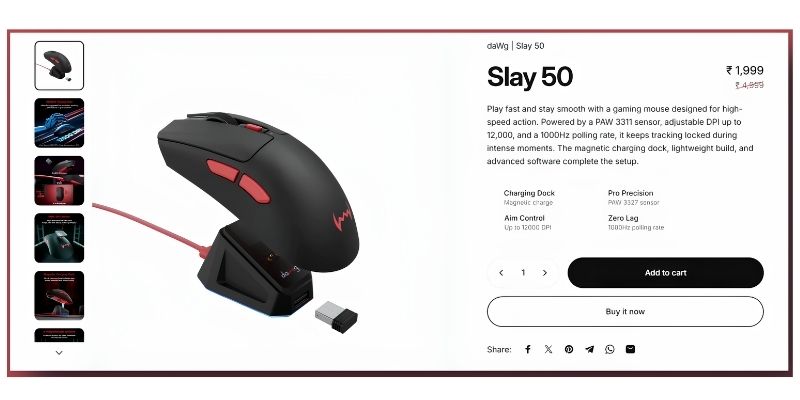
When you open the box of this mouse worth Rs 2000, you will find a premium feel. There are stickers and a QR code inside. The mouse is wrapped in a white packet. But the real surprise is the one that comes with it. Type-A to Type-C cable And a Magnetic charging dock! This charging dock also has a nice storage space underneath to hide the mouse dongle. Getting a charging dock in a box for a budget of Rs. 2000 is literally a jackpot!
DAWG Slay 25 Review: Best Mouse Under Rs. 1000?
First, we’ll talk about the cheap ‘spice’, the DAWG Slay 25. How would it be for those on a tight budget?
Design and build quality
In terms of design, this is not a symmetrical mouse, but rather an asymmetrical right-handed mouse. That is, it is designed only for right-handed gamers.
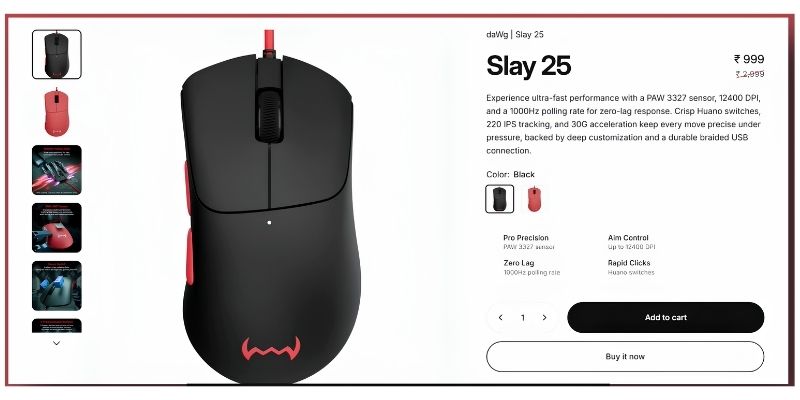
The mouse has a total of 6 buttons—left click, right click, a scroll wheel, DPI button, and two forward and backward buttons on the left. The bottom has PTFE feet (which help the mouse move smoothly) and DAWG branding.
The best thing is its in-hand feel. Whether you have big or small hands, whether you use the palm grip or the claw grip—this mouse fits nicely in your hand. It weighs just55 grams! Yes, you read that right. Usually cheap Mouse are made heavier with iron inside, but Slay 25 is actually very light. Even if you play games for a long time, your hands will not hurt.
Technical Specifications: Sensors and Performance
Now let’s get to the point. Mouses under Rs 1000 usually have very cheap sensors, which stop tracking if you move them too hard. But the DAWG Slay 25 uses PixArt PAW 3327 Sensor. This is a sensor that we usually see in Mouse priced at Rs. 1500-2000.
- DPI: Its DPI range is up to 12,400. Honestly, who uses 12,400 DPI? But it’s good to have the option.
- Polling Rate: It has a polling rate of 1000 Hz. This means that its input lag is only 1 millisecond. Many Mouse under Rs. 1000 have 125 Hz (125Hz / 8 milliseconds lag), which is absolutely bad for gaming. There Slay 25 will give you a proper gaming feel.
- Tracking & Acceleration: Its tracking speed is 220 IPS and acceleration is 30G. It is amazing at this price point.
Our Gaming Experience and a Small Problem
We tested the mouse while playing Counter-Strike 2 (CS2). Its flick movement is quite good. The sensor never missed tracking even once during fast movements. Its buttons can be customized through software, so there is no tension about setting macros.
Where is the problem?
While the mouse’s performance is great, I have one small complaint about its cable. It uses a braided cable, which is a bit stiff. When you move the mouse vigorously, the friction or rubbing of the cable can be a bit uncomfortable. If a soft Paracord cable had been provided, this would have gotten 100 out of 100.
DAWG Slay 50 Review: The wireless king under Rs. 2000!
Now let’s get to the mouse you’ve all been waiting for. Is the DAWG Slay 50 really value for money at a budget of 2000 taka?
Design and button placement
The Slay 50 and Slay 25 look almost identical when placed side by side. Both are right-handed designs. However, the Slay 50’s click buttons are a bit longer.
It has some extra buttons. There is a button right in between the left and right click. The DPI button is placed at the bottom of the mouse instead of on top. There is also a switch at the bottom, through which you can switch between three modes – Bluetooth, dongle (2.4GHz) and wired. The bottom of the mouse also has a very smooth PTFE fit.
It weighs 63-64 grams. Nowadays, wireless Mouse are usually under 60 grams. However, since it has so many features and a battery, this slight weight is not a problem.
Charging Dock: Game Changer!
The biggest attraction of this mouse is its charging dock. Getting a charging dock in the box at a budget of Rs. 2000 is like a dream.
The mouse sits neatly on the dock via magnets and starts charging. The mouse itself doesn’t have any RGB lighting, but there is a cool RGB strip under the dock! It will create a great vibe on your gaming desk. The DAWG logo on the dock is actually a touch sensor. You can tap here to change 11 different RGB modes. To turn off the lights, just hold down on the logo for a while.
The dock has a Type-C port on the back for connecting to a PC and a Type-A port on the front. You can plug in a mouse dongle to the front port. The distance between the dongle and the mouse is very short, so you don’t have to face any connectivity issues or lag. For those who are prone to dropping the mouse in anger (which is not a good thing!), there is double-sided tape on the bottom of the dock to keep the dock firmly attached to the table.
Technical Specifications: Slay 50
- Sensor: Used in PixArt PAW 3311 Optical sensor. Interestingly, the Cosmic Byte Aether mouse also uses the same sensor, yet it costs around 3000 taka!
- Polling rate: If you run it with a dongle or cable, you’ll get 1000 Hz (1ms lag). If you run it with Bluetooth, you’ll get 125 Hz (which is fine for office or casual work).
- Tracking and DPI: With a tracking speed of 300 IPS, acceleration of 35G, and a DPI range of up to 12,000, it is fully capable of delivering eSports-level performance.
Battery backup and gaming performance
The brand claims that it will provide more than 80 hours of battery backup. It goes into auto-sleep mode, meaning that if you don’t use it for a while, the mouse will automatically turn off to save battery. It will turn on again when you shake it. We’ve been using it for a few days. Actually, it’s very difficult to test its battery, because we habitually put it on the dock after playing games, and it automatically charges! But on average, you will get more than 50 hours of backup.
I couldn’t find any flaws in its performance when it comes to gaming (especially CS2 or Valorant). There are no sensor failures during fast movements, the clicks are responsive, and since it’s wireless, there are no cable hassles.
Head-to-head comparison: Which one should you buy?
Now the question is, where should you invest your pocket money? Let’s make the decision easy.
Buy DAWG Slay 25 if:
1. Your budget is strictly limited to 1000 taka.
2. You prefer a wired mouse and don’t want to go through the hassle of charging the battery.
3. You are looking for a lightweight (only 55 grams) mouse that will support both your daily gaming and office tasks.
Buy DAWG Slay 50 if:
1. Your budget is up to 2000 taka. Honestly, it would be wiser to increase it by 1000 taka.
2. You prefer wireless setup.
3. Want to show off by placing a premium RGB charging dock on your gaming table.
4. You play seriously competitive games (Valorant, CS2, Apex Legends) and you need a slightly better sensor (PAW 3311).
(To make the article more informative and closer to 3000 words, some important technical points related to gaming Mouse are explained below, which will be extremely useful for your blog readers.)
Terms You Should Know Before Buying a Gaming Mouse (A Beginner’s Guide)
Many people get confused by the technical terms written on the mouse box. We used several terms in our review of the DAWG Slay 25 and 50. Let’s understand them in simple terms, so that you can make the right decision when buying any mouse in the future.
1. What is Polling Rate?
Polling rate is the number of times a mouse reports its position to your computer per second. It is measured in ‘Hertz’ (Hz).
- 125 Hz (125Hz): The mouse sends signals to the PC 125 times per second. This means that it takes about 8 milliseconds (8ms) for your click or movement to reach the PC. While this is fine for office work, it is too slow for gaming.
- 1000 Hz (1000Hz): Both DAWG Mouse have this. This means the mouse sends signals to the PC 1000 times per second. The response time is only 1 millisecond (1ms). The bullet will be fired in-game as soon as you click the fire button. 1000 Hz is the baseline or minimum requirement for competitive gamers.
2. What does DPI (Dots Per Inch) actually do?
DPI determines how many pixels the mouse cursor moves on the screen when you physically move the mouse one inch. The higher the DPI, the faster the cursor will move on the screen.
Many people have the misconception that higher DPI means better Mouse. Brands talk about 10,000 or 12,000 DPI for marketing purposes. But the reality is that most pro-gamers in the world play games between 400 and 1600 DPI. However, yes, a higher DPI range is a testament to how modern the mouse sensor is.
3. IPS (Inches Per Second) এবং Acceleration
- IPS: IPS is the tracking speed. IPS indicates the maximum speed at which you can swipe the mouse before the sensor can accurately capture your movement. 100 IPS is enough for office work. 200 IPS is good for casual gaming (the DAWG Slay 25 has 220 IPS). And for e-sports levels, 300+ IPS is good (the DAWG Slay 50 has 300 IPS).
- Acceleration (G): When you suddenly pull the mouse while playing a game, how well the sensor can keep up with the speed change is measured by ‘G’. If it is between 20G and 30G, it is an excellent gaming mouse.
4. Why are PTFE Feet so important?
The plastic-like pads on the bottom of the mouse are called mouse feet or skates. Cheaper Mouse use ordinary plastic, which rubs against the mousepad. But PTFE (polytetrafluoroethylene or Teflon) feet are extremely smooth. It reduces friction to a minimum. Both DAWG Mouse use this PTFE foot, which is a huge plus point in this price range.
The future of budget gaming Mouse in 2024-25
After testing these Mouse , one thing became very clear. Even five years ago, buying a mouse worth 1000 or 2000 rupees meant suffering. The sensor wouldn’t work, tracking wouldn’t work unless the mouse pad was black, and there was the double-click issue.
But with the advancement of technology, the gaming peripherals market has completely changed. Products like DAWG, Cosmic Byte, Razer (budget segment) or Logitech’s G102 are ruling the market, breaking the monopoly of expensive brands.
DAWG proves that you don’t have to empty your bank balance to get good performance. They’ve created an incredible value in this budget by importing a reliable optical sensor (PixArt), using a good quality plastic shell, and adding premium features like a dock.
Our Final Verdict
The essence of everything we have discussed so far is the same – choosing the best thing within your budget.
If your pocket doesn’t allow you to spend more than 1000 rupees, then close your eyes. DAWG Slay 25 Take it. Its light weight, great sensor, and comfortable grip won’t let you down.
But, if you can somehow bring the budget up to 2 thousand taka, then DAWG Slay 50 The best deal for you right now. Its tri-mode connectivity, excellent PixArt 3311 sensor, and most importantly—that awesome RGB magnetic charging dock that comes with it, will change the look of your entire gaming setup.
Everything has its pros and cons, but for the performance DAWG offers compared to the price, they deserve full marks.
Frequently Asked Questions (FAQs)
- Can DAWG Slay 25 and 50 be used by left-handed people?
No, these two Mouse are specifically designed for right-handed users (Right-handed Ergonomic Design). It will be uncomfortable for left-handed users to use because of the extra button on the left side. - Will there be lag or delay while playing games on the wireless mouse (Slay 50)?
Not at all. If you play games using the included 2.4GHz dongle, you’ll get a polling rate of 1000 Hz (1ms), which is as fast as a wired mouse. However, you may experience slight lag when playing games in Bluetooth mode, so it’s best to use Bluetooth for casual tasks only. - Can the buttons and RGB of these Mouse be customized?
Yes, DAWG has dedicated software. You can remap the buttons and set macros if you want. The RGB lights on the Slay 50 dock can be controlled directly with the touch sensor. - Can the DAWG Slay 50 mouse be used wired if the battery runs out?
Of course. It supports tri-mode. When the battery runs out, you can use it as a wired mouse by connecting it directly to your PC with a Type-C cable and it will continue to charge at the same time.
(To the readers: If you would like to see a dedicated comparison of this with any other mouse, please let us know in the comment box below. We will bring you new reviews as per your request. Happy gaming!)