
There was a time in the gaming world when buying a good quality gaming mouse meant you had to shell out a lot of money. Especially if you were looking for a mouse with tri-mode connectivity, RGB lighting, and a good sensor, many people would hold back due to budget considerations. But times have changed!
- 1. Unboxing experience and variants
- 2. Design and Build Quality: Looks premium from a distance!
- 3. Button layout and ground floor condition
- 4. Connectivity: Tri-mode magic!
- 5. Technical Specifications: Sensors, Polling Rate and Performance
- 6. The biggest deal-breaker: The weight of the mouse!
- 7. Switch and click filling
- 8. Battery life: The real reason for being overweight
- 9. Customization Software (Web-Based Software)
- 10. Comparison with competitors and alternative options
- 11. Final Verdict: Should you buy it?
- Frequently Asked Questions (FAQs)
A few days ago, we reviewed several budget gaming mice from Cosmic Byte (Aether, Umbra, Ignis, etc.), which were priced between 1300 and 3000 taka. At that time, many gamers and viewers asked us— “Bro, is it possible to get something better for cheaper than this?”
Popular gaming accessories brand Cosmic Byte has come up with a great answer to that question. They have launched their latest release—Cosmic Byte Helios The most surprising thing is that the price of this mouse starts at just 1000 taka!
Yes, you read that right. For just Rs 1000, you get a 1000Hz polling rate, tri-mode connectivity and dedicated software support. But the question is, does offering so much for so little mean that there has been some serious ‘cost cutting’ or discounting somewhere? Is this mouse really suitable for gamers, or is it just a cheap surprise?
Let’s do a thorough analysis of Cosmic Byte Helios in today’s article.
1. Unboxing experience and variants
When you buy a cheap product, you don’t have much expectation about the box or packaging. But Helios will surprise you a little here.
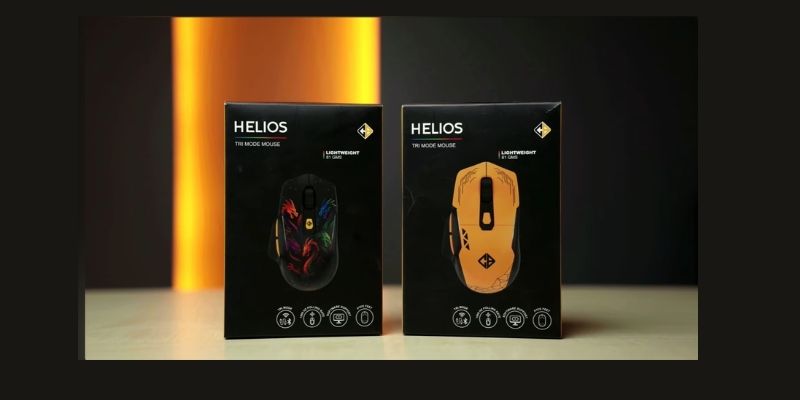
This mouse is available in two attractive variants or color options in the market:
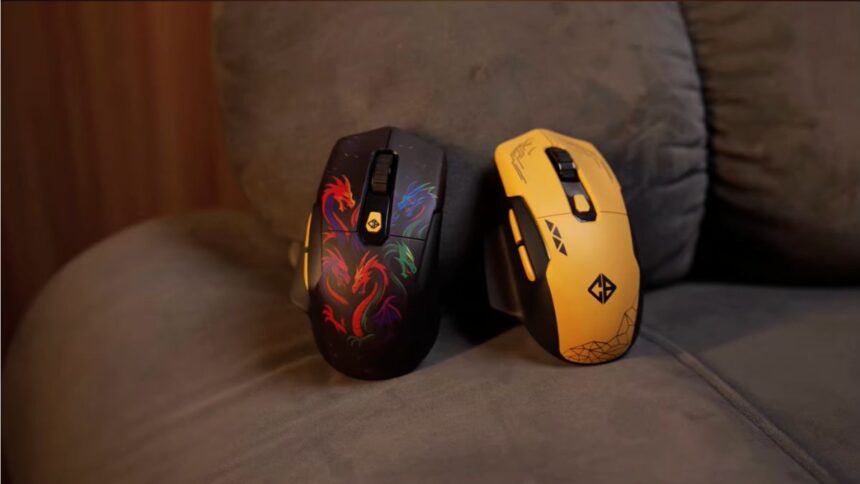
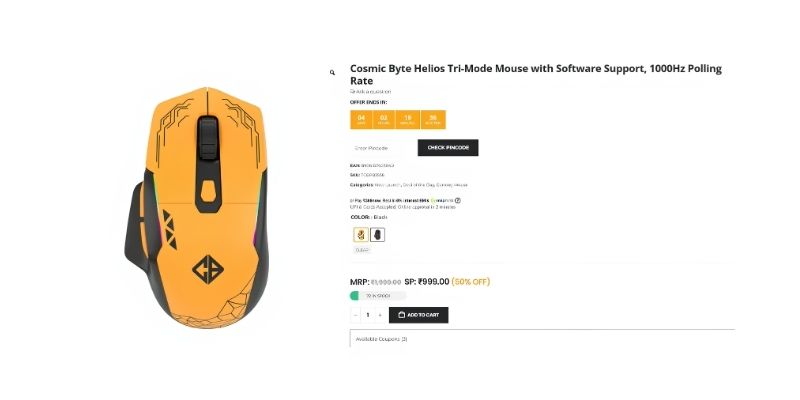
- Yellow color variant: Its price is exactly 1000 taka. Its body has some nice geometric patterns which give it a very sporty look.
- Black variant: It costs 100 taka more than the yellow one (1100 taka). This mouse has a great dragon design on its body, which creates a premium gaming vibe.
What’s inside the box?
- A Cosmic Byte Helios gaming mouse.
- A premium Type-A to Type-C charging and data cable.
- Some paperwork and user manual.
2. Design and Build Quality: Looks premium from a distance!
If you place the mouse on the table and look at it from a distance, you won’t even realize that it’s a mouse worth only 1,000 taka. Its design and looks are so attractive.
Matte finish and material
The entire mouse is made of polycarbonate plastic, but the matte finish on top gives it a solid and premium feel. The quality of the plastic is quite good, and it doesn’t feel cheap or flimsy in the hand.
RGB Lighting
Gaming mouse means RGB! The pattern or dragon design on the body of this mouse beautifully shines through the RGB light. Even if you play games in a dark room, you will see a faint glow coming out from around the scroll wheel. It will fit in well with your gaming setup.
Ergonomics
This is a right-handed mouse, meaning it is designed with right-handed users in mind. The mouse has a nice thumb rest on the left side. This ensures that you don’t have any grip issues even if you hold the mouse for a long time.
3. Button layout and ground floor condition
The mouse has a total of several functional buttons:
- Left and right click (main click).
- A textured scroll wheel.
- There is a dedicated DPI changing button just below the scroll wheel.
- Two forward and backward buttons on the left side of the mouse (can be customized for any task).
What’s under the mouse?
Looking down, you’ll find the on/off switch and the button to change connectivity modes. There’s also a small chamber here that neatly hides the 2.4GHz USB dongle.
What I like the most is its PTFE fit (the pad under the mouse). Such a smooth PTFE fit is not usually seen in a budget of 1000 taka. It glides like butter on the mousepad.
4. Connectivity: Tri-mode magic!
The biggest selling point of the Cosmic Byte Helios at this budget is its connectivity. It’s a ‘tri-mode’ mouse. This means you can pair it with your device in three different ways:
- Wired mode: By plugging the cable into the front Type-C port, you can connect it directly to your PC and play games with zero-latency, while the mouse will also continue to charge.
- 2.4GHz Dongle Mode: Plug the dongle into your PC for wireless gaming and enjoy a smooth connection without the hassle of wires.
- Bluetooth mode (Bluetooth): Bluetooth is best for general work or office use.
Interesting fact: It has two different Bluetooth profiles (BT1 and BT2). This means you can connect the mouse to your laptop and tablet at the same time if you want. You can switch from one device to another in the blink of an eye by pressing the button on the bottom of the mouse. It’s just great for multi-tasking!
5. Technical Specifications: Sensors, Polling Rate and Performance
The real magic of a gaming mouse lies in the hardware inside. Let’s take a look at what the Helios has to offer.
Sensor performance
The mouse uses a combination of FR201 + S203 sensors. To be honest, this is an entry-level sensor. If you are doing office work, browsing, video editing or casual gaming (such as GTA 5, RDR2 etc. story mode games), then this sensor will give you great support.
Polling rate and latency
- In dongle and wired mode: You will get a polling rate of 1000 Hz. This means that the mouse’s response time will be only 1 millisecond (1ms). You will not experience any lag or latency while gaming.
- In Bluetooth mode: The polling rate will drop to 125 Hz and the response time will be 8 milliseconds (8ms). While this is fine for general use, it is best not to use Bluetooth for competitive gaming.
Pro-tip: The more you increase the mouse polling rate, the more strain it will put on your PC’s processor (CPU). So, unless you have a very high-end PC, avoid using unnecessarily high polling rates.
DPI and Speed
The mouse has the ability to set DPI from a minimum of 200 to a maximum of 10,000. When you press the DPI button, the mouse’s RGB lights will change to let you know which DPI level you are at.
It has 20G acceleration and 60 IPS tracking speed. These features will come in handy when you move the mouse quickly or take a ‘flick shot’ in games. However, since it is entry-level, it is not suitable for very hardcore e-sports gamers.
6. The biggest deal-breaker: The weight of the mouse!
I’ve said a lot of good things so far, now let’s come to the weakest or negative aspect of this mouse. And that is its weight.
The Cosmic Byte Helios mouse weighs about 81 to 82 grams! In the current e-sports world, lightweight mice (40-50 grams) are gaining popularity. In comparison, 82 grams is quite heavy.
What is the problem with being overweight?
If you play competitive games like Valorant or CS:GO for long periods of time, moving this heavy mouse can cause fatigue or exertion in your wrists.
However, if you are already using a heavy or regular mouse and this is your first gaming mouse, then this weight will not seem like a problem to you. In fact, a heavy mouse feels quite ‘solid’ to many people.
7. Switch and click filling
Keeping longevity in mind, it uses ‘Huano’ brand switches. According to the company, these switches will give you a guaranteed lifetime of 10 million (10 million) clicks.
Although it’s hard to say who will actually sit down and count a million clicks! However, Huano switches are generally quite durable and their click sound is quite crispy and satisfying.
8. Battery life: The real reason for being overweight
The main culprit behind the mouse’s heaviness is its battery. This tiny mouse has a whopping 500mAh battery tucked inside!
Due to the large size of the battery, its backup is also just a breeze:
- If you keep the RGB light on: You will get about 20 hours of continuous backup.
- If you turn off the RGB lights: It will provide continuous service for about 50 hours.
Such a long battery life is truly commendable in the budget segment. Once the charge is finished, it can be easily recharged using the Type-C cable.
9. Customization Software (Web-Based Software)
Another great thing about this mouse is its web-based software. Usually, cheap mice don’t have any dedicated software. But the Helios gives you that advantage too.
This software works on both Windows and Mac operating systems. However, the condition is that the mouse must be connected in dongle or wired mode while using the software.
What can you do with the software?
- Key Mapping: Except for the left click, you can customize the remaining 5 buttons to your liking and assign any function or shortcut.
- DPI setting: You can set your preferred DPI level for different tasks.
- RGB Control: There are 6 different RGB modes. You can also turn the lights off completely to save battery if you want.
- Scroll direction: There is also an option to reverse or invert the scrolling direction, just like MacBook users.
- Factory reset: If any setting is messed up, there is an option to reset everything to the previous state with one click.
10. Comparison with competitors and alternative options
There are many non-branded mice available in the market under a budget of 1,000 taka, but their build quality or sensor are nowhere near the Helios.
However, if you are a serious gamer and e-sports are your main focus, then this mouse is not for you. In that case, I would suggest you to increase your budget by just 300 taka.Cosmic Byte Umbra(Price 1300 Taka) To see the mouse. That mouse weighs only 53 grams, which is ideal for competitive gaming.
11. Final Verdict: Should you buy it?
All things considered, the Cosmic Byte Helios offers some amazing value for its price tag.
Who would buy this mouse?
- If your budget is a fixed 1000 taka.
- If you want a mouse that can be used for both office work and light gaming.
- If you need tri-mode connectivity to work on multiple devices (PC, laptop, tablet).
- You love playing story-mode games and a heavy mouse is not a problem for you.
Who is this mouse not for?
- Hardcore competitive gamer (Valorant, CS2, Apex Legends player).
- Those who prefer a very lightweight or light mouse.
The company has tried to give us polling rate, RGB, tri-mode, and premium looks in a gaming mouse that costs just a thousand taka. So all in all, this is undoubtedly a “Must Buy” product for budget gamers.
Frequently Asked Questions (FAQs)
- Will the Cosmic Byte Helios mouse work with a MacBook?
Yes, of course! It can be easily connected to a MacBook through its tri-mode Bluetooth connectivity. Even its web software supports Mac. - Can I play games like Valorant or Free-Fire with this mouse?
Of course, you can play. However, since it weighs a little more (82 grams) and the sensor is entry-level, your hands may get a little tired when playing professional or rank-pushing games. There is no problem for casual gaming. - Is it possible to turn off its RGB lights completely?
Yes, you can easily turn off the RGB lights using its dedicated web software. This will also more than double your battery backup (up to 50 hours). - What is the difference between Bluetooth and dongle mode?
Dongle mode (2.4GHz) is designed for gaming, as it has no latency or delay at all (1ms response). On the other hand, Bluetooth mode is good for general work, browsing or watching movies, as it has a low latency (8ms) that is not noticeable to the naked eye. - Is there any difference between the yellow and black variants other than price?
No, there is no difference in internal performance, battery, sensors or features. The black mouse uses a dragon design, which is a little more attractive to look at. It is mainly because of this design that its price has been kept 100 taka higher.
(Special Note: The prices of gadgets in the technology market can change at any time. The prices mentioned in this article are as of the time of the mouse’s release. Be sure to check the current prices from your local market or e-commerce website before purchasing.)
Tell us what you think!
Have you ever used a mouse with a 10 million click lifespan? How long did your mouse last? Share your experience with us in the comments box below. If you want a review of any new gadget, don’t forget to let us know!