
Let’s talk about a very common but controversial topic today. A few days ago, I published a piece of content about the budget monitor. Someone commented, “Brother, I bought a 24-inch Acer monitor for just 5-6 thousand taka. I’m not having any problems. So why do people only buy monitors for 15 to 20 thousand taka or more? Why do you call a monitor worth 20 thousand taka a ‘budget monitor’?”
- Unboxing and First Impressions: What’s in the box?
- Ports and Connectivity: The impact of cheapness is evident here
- Display and color quality: Here’s the real surprise
- The real truth about “1ms Response Time” (VRB technology)
- Refresh Rate and Gaming Experience
- Audio: No built-in speakers
- The real debate: Rs 6,000 monitor vs Rs 20,000 monitor
- 1. Resolution and size
- 2. Type-C port and reverse charging
- 3. Pro-level color accuracy
- 4. Ergonomic Stand
- 5. Professional Gaming Features
- Who should buy this monitor?
- Final Verdict
- Frequently Asked Questions (FAQs)
After reading the comment, I thought for a moment. It makes sense! Not everyone needs a high-end monitor for 4K resolution or color grading. There are many who just want a bigger display to get rid of the small screen of their laptop.
This comment made me think so much that I went and bought it myself from Amazon for just 6,400 taka. Acer EK240Y P6 (24-inch IPS Full HD) I ordered the monitor. I wanted to see if a monitor costing 6,000 taka was really enough for our daily work? Or was there some kind of big secret or ‘cost-cutting’ by the company behind it?
In today’s article, I will discuss in detail the unboxing of this monitor, including display quality, gaming performance, and the ever-familiar question – “The real difference between a 6,000 vs. 20,000 monitor.”
Unboxing and First Impressions: What’s in the box?
The first thing I noticed after receiving the box from Amazon was that the box was quite light. However, the packaging was decent for the price.
What I found inside the box:
- Monitor panel (24 inches)
- A basic plastic stand
- A power cable
- An HDMI cable
- User manual and warranty card
Installing the stand isn’t rocket science. You just need to insert it into the slot at the back and it locks in place. As for the design, it’s all made of plastic. The back of the monitor is a bit curvy and the bottom is a bit thick. However, the bezels are quite thin, which is really nice to see on a monitor at this price.
The stand is a bit basic. You can only tilt the monitor forward or backward. There is no option to adjust the height. But one great thing is that despite being so cheap, the company has provided a VESA mount (wall mount) option on the back. That is, you can set it on a monitor arm or wall if you want.
Ports and Connectivity: The impact of cheapness is evident here
Budget monitoring means that the company has to cut costs somewhere, and that burden usually falls on the ports.
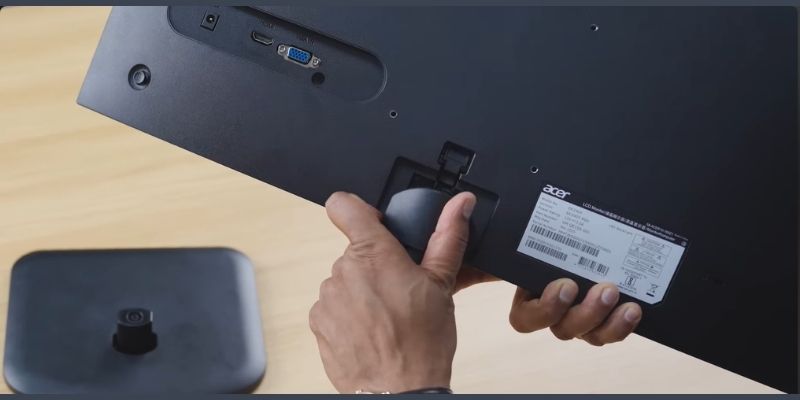
You will find only three ports on the back of this monitor:
1. A power port
2. An HDMI port
3. A VGA port (which is almost useless in this day and age)
There is no Type-C port, no USB hub, and not even an audio jack for plugging in earphones.
Another minor issue is the ‘cable management’. There are no hooks or loops on the monitor stand to hide the cables. As a result, the cables can look a bit strewn across your desk. However, considering the price tag of 6,000 taka, there is no other way but to accept these minor issues.
Display and color quality: Here’s the real surprise
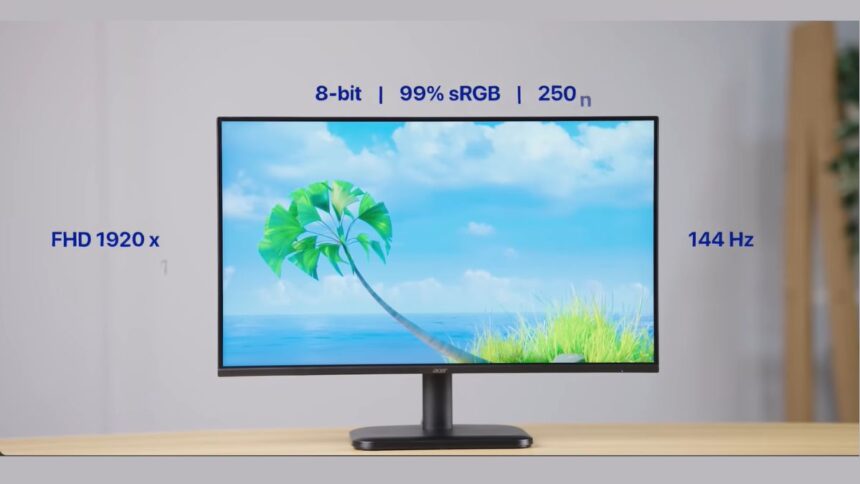
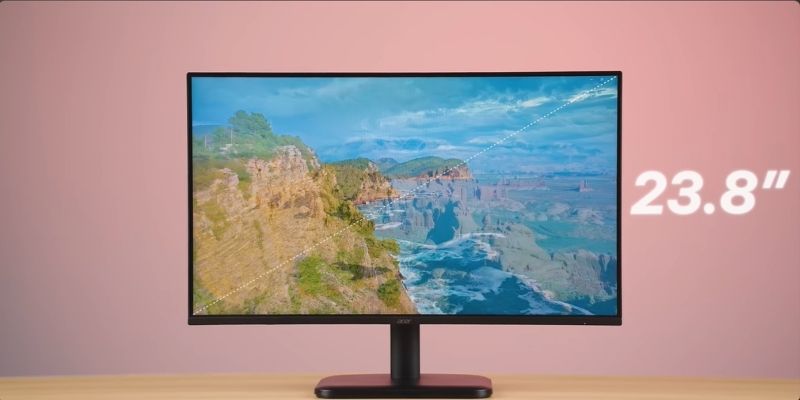
The main reason to buy a monitor is its display. The Acer EK240Y P6 monitor is a23.8-inch Full HD (1920x1080p) IPS LCD panel Bring it.
To be honest, I wasn’t expecting a very good display at this price point. But after turning on the monitor, I was pleasantly surprised!
- Color Accuracy: Since it is an IPS panel, its color reproduction is excellent. Compared to monitors that I use for 15-20 thousand rupees, its color is not much behind in any area. Its colors are very vibrant and natural for watching videos on YouTube, Netflix, or general browsing. There is no over-saturation or excessive sharpness.
- Viewing Angle: One of the biggest problems with cheap panels is that the screen goes black when viewed from the side. But since it’s IPS, you won’t have any issues with color shift or darkening when viewed from any angle.
- Brightness: It has a brightness of 250 nits. If you work in normal room light or sitting next to a window, this brightness is enough for you. And due to its matte finish (Matte display), the reflection of light on the screen is less.
But one thing to keep in mind is that this is not a 2K or 4K display. Since it is a large 24-inch screen and Full HD resolution, if you sit very close to the monitor (within a foot), you may notice light pixels. However, if you work from a normal distance (2-3 feet), you will not notice anything.
The real truth about “1ms Response Time” (VRB technology)
Companies are sometimes a little clever when it comes to marketing. This monitor has big words on the box.“1ms Response Time”1ms response time for 6000 taka! Can you imagine?
But after a little digging, I found that it is not true 1ms. It is basically VRB (Visual Response Boost) Achieves 1ms using technology.
What exactly is VRB?
In simple terms, it’s a technique for reducing motion blur. When you’re gaming and there’s very fast movement on the screen, VRB automatically senses and reduces the blur so that your response time feels fast.
However, it has one major downside:
When you manually turn on this VRB using the button on the back of the monitor, the monitor’s brightness will be significantly reduced. It works in two stages – ‘Normal’ and ‘Extreme’. If you go to ‘Extreme’ mode, the screen will become so dark that it will be difficult to play games in daylight.
Additionally, VRB can cause slight flickering or shaking on the screen when turned on, which can cause eye strain if used continuously for a long time. Therefore, it is best to keep this option turned off for those who are not professional gamers.
Refresh Rate and Gaming Experience
Acer’s monitors in this series typically come with a refresh rate of 100Hz or 144Hz (varies by model). A refresh rate of 100Hz or higher means the screen is much smoother than a typical 60Hz monitor.
You will clearly feel this smoothness when you scroll the mouse, open folders or play any casual game (like GTA V or Minecraft). However, if you are a competitive gamer at the e-sports level (like Valorant or CS:GO), then this monitor is not for you. For that, you will have to go for a higher budget monitor.
Audio: No built-in speakers
It might be foolish to expect speakers on a monitor at this price. The Acer EK240Y P6 monitor doesn’t have any built-in speakers. There’s even no 3.5mm audio output jack for connecting external speakers.
So you have to rely on your PC or laptop speakers. Or you have to buy a good external speaker (like Portronics or Boat) from the market for between 500-1000 taka which you can connect directly to the PC.
The real debate: Rs 6,000 monitor vs Rs 20,000 monitor
Now, let’s answer the original comment. If a monitor for Rs 6,000 has such a good display, such great colors, and smooth performance, why would people spend Rs 20,000 or more on a monitor?
The answer lies in the “need” or use-case. In a monitor priced at 20,000 taka, you will find many things that this 6,000 taka monitor does not have. For example:
1. Resolution and size
In a budget of 20 thousand taka, you will get a large display of 27 inches or 32 inches. Also, the resolution will be 2K (1440p) or 4K. If you are doing video editing, working in Photoshop, or coding, then a larger screen and higher resolution will make your multitasking much easier.
2. Type-C port and reverse charging
This is a game-changing feature. Expensive monitors have Type-C ports. You can connect your laptop (like MacBook) to the monitor with just one cable. The monitor will give you a display, and your laptop will be charged with the same cable! No need to connect a separate laptop charger.
3. Pro-level color accuracy
While budget monitors may look good, they are not good enough for professional color grading. Expensive monitors have color gamuts like 99% sRGB, DCI-P3, which are essential for graphics designers.
4. Ergonomic Stand
Budget monitors only tilt forward and backward. But expensive monitors allow you to adjust the height, swivel left and right, and even turn the entire screen into portrait mode—which is very useful for coders or programmers.
5. Professional Gaming Features
In expensive monitors, you’ll find features like true 1ms GTG response time, AMD FreeSync Premium, or Nvidia G-Sync, which transform the high-end gaming experience by preventing screen tearing.
In a nutshell You can make calls and take pictures with a smartphone worth 10,000 taka. You can do the same with an iPhone worth 1 lakh taka. But the performance and user experience of the two are never the same. The same is true with monitors.
Who should buy this monitor?
I’ve talked a lot about technical stuff so far. Now let’s get straight to the point. Compare the following points to see if the Acer EK240Y P6 is for you:
You should buy if:
- Your budget is very tight (between 6-7 thousand taka).
- You are a student and want to shift from the small screen of a laptop to a larger screen for online classes or assignments.
- You are looking for a reliable monitor to view CCTV footage.
- Your main tasks are general office work, Excel sheets, reading emails, or web browsing.
- Your intention is to watch a casual movie or do some light gaming on the weekend.
You should not buy if:
- You are a professional video editor or graphics designer.
- You are a hardcore competitive gamer.
- You are a MacBook user and want a single cable Type-C setup.
Final Verdict
At the end of the day, the Acer EK240Y P6 monitor really impressed me. A 24-inch IPS panel with such good color quality for a budget of just 6000-6500 taka would have been hard to imagine even a few years ago.
The company has indeed cut costs in some areas (such as the quality of the stand, lack of ports, lack of speakers), but the company has not compromised on the monitor’s real function, which is “providing display output.”
So, if you are a very casual user and want a reliable monitor from a brand at a low cost, then this monitor can definitely take a place on your desk. And if your budget is high and your needs are pro-level, then it would definitely be wise to go towards the budget of 15-20 thousand taka.
Frequently Asked Questions (FAQs)
1. What is the refresh rate of the Acer EK240Y P6 monitor?
This monitor typically supports a 100Hz refresh rate, which provides a much smoother experience than a typical 60Hz monitor.
2. Does this monitor have inbuilt speakers?
No, this monitor does not have built-in speakers or a 3.5mm audio jack. You will need to use separate external speakers.
3. Is it good for gaming?
This is great for casual gaming or playing story-mode games. However, if you do eSports or competitive gaming, it’s better to get a more expensive monitor with a true 1ms response time.
4. Is there an HDMI cable in the box?
Yes, the monitor comes with an HDMI cable and a power cable inside the box.
5. Can this be used with a MacBook?
Yes, but MacBooks usually don’t have an HDMI port (older models). In that case, you will need to connect the monitor using a Type-C to HDMI dongle or hub.
6. Should VRB mode always be on?
No. VRB mode reduces brightness and can be straining on the eyes. You can only turn it on when playing fast-paced games, it is better to keep it off for everyday tasks. Let’s talk about a very common but controversial topic today. A few days ago, I published a piece of content about the budget monitor. Someone commented, “Brother, I bought a 24-inch Acer monitor for just 5-6 thousand taka. I’m not having any problems. So why do people only buy monitors for 15 to 20 thousand taka or more? Why do you call a monitor worth 20 thousand taka a ‘budget monitor’?”
After reading the comment, I thought for a moment. It makes sense! Not everyone needs a high-end monitor for 4K resolution or color grading. There are many who just want a bigger display to get rid of the small screen of their laptop.
This comment made me think so much that I went and bought it myself from Amazon for just 6,400 taka. Acer EK240Y P6 (24-inch IPS Full HD)I ordered the monitor. I wanted to see if a monitor costing 6,000 taka was really enough for our daily work? Or was there some kind of big secret or ‘cost-cutting’ by the company behind it?
In today’s article, I will discuss in detail the unboxing of this monitor, including display quality, gaming performance, and the ever-familiar question – “The real difference between a 6,000 vs. 20,000 monitor.”